 English
If you are comparing led rental display manufacturers because you have a tour date in Manchester, a trade show in Frankfurt, or a church stage that needs to look bigger than the budget allows, you probably already noticed something odd: three quotes can all say "P3.91 rental cabinet" and still differ by forty percent. That is not a mistake. It is the difference between a cabinet that survives twenty load-ins and one that does not make it past the third. We have rented, owned, damaged, repaired and re-sold these screens for years, so what follows comes from actual cases rather than a factory spec sheet. Let us get straight to the things that change whether you make money on the job.
A fixed screen is built once and left alone. A rental cabinet gets packed, unpacked, dropped off a truck, carried up stairs, knocked by a roadie's boot, rained on at an outdoor festival, and then asked to look perfect under camera. That changes everything about what you should buy.
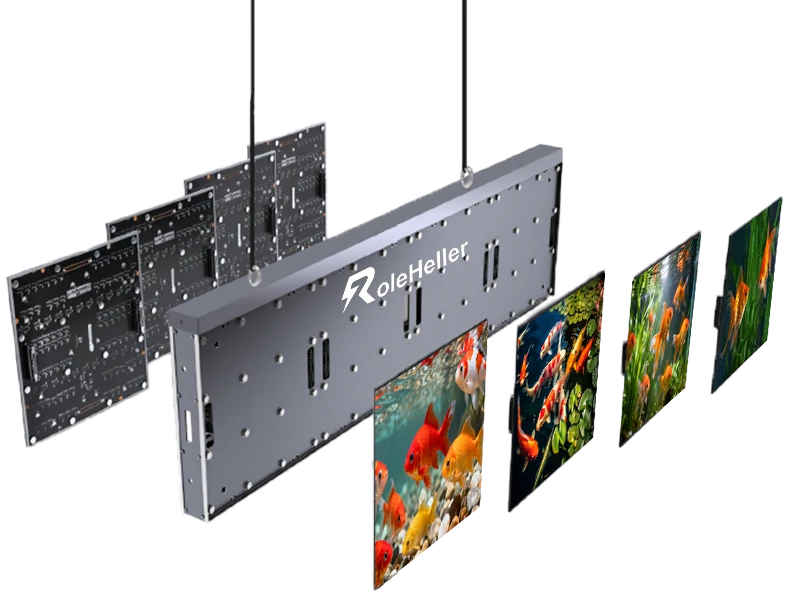
The short answer: buy for serviceability and mechanical abuse, not for the highest brightness number. Brightness matters, sure. But a bright panel that takes six minutes to swap when a module dies during soundcheck costs you more than a slightly dimmer one that swaps in forty seconds.
| Spec | Typical quote | What we actually want |
|---|---|---|
| Pixel pitch | P2.6 / P3.91 / P4.81 | P3.91 for general stage, P2.6 only if cameras are close |
| Cabinet size | 500×500 mm or 500×1000 mm | Both sizes from the same maker, so they mix on the same rig |
| Material | Die-cast aluminium | Magnesium-aluminium alloy if you can get it — lighter, and weight is what kills your crew |
| Weight | ~7–9 kg per 500×500 panel | Ask for actual measured weight with handles and locks fitted |
| Refresh rate | 3,840 Hz | 3,840 Hz minimum for broadcast; do not accept 1,920 Hz on a camera job |
| Brightness | 800–1,200 nits (indoor), 4,500+ (outdoor) | Indoor stage needs far less than you think; outdoor needs auto-brightness sensor |
| Service | Front and rear | Front service is essential when panels are wall-mounted or hung tight |
| Locking mechanism | Standard quick lock | Check spare lock availability — locks are the most commonly broken part |
| IP rating | IP43 indoor | Outdoor rental needs IP65 front; check the door gasket, not just the brochure |
| Power | daisy-chain powerCON | Loop-through power and signal, with spare cables included |
One thing worth saying plain: the cabinet is the product, the LED module is just a consumable. Modules will die. Cabinets that keep working after being dropped are the ones worth paying for.
This is where most buyers get lost, because every company calls itself a manufacturer. In practice there are four lanes, and knowing which lane you are talking to tells you more than any certification badge.
First, the big listed groups that build everything in-house — lamps, cabinets, control systems. They are good when your job is large, repeated, and someone's reputation is on the line. Their weakness is simple: small orders get slow responses, and custom requests go into a queue. Second, the mid-size Shenzhen export factories that specialise in rental cabinets. This is where most rental companies actually buy. Quality varies between batches, which is exactly why inspection matters. Third, the assembly houses that buy modules and cabinets from others and put their logo on the flight case. Not automatically bad, but you must know who fixes it when it breaks. Fourth, the trading companies that have no production at all. Some of them are genuinely useful — they know five factories and can source fast — but you pay for that knowledge and you must be clear about who holds the warranty.
We stopped asking "are you a factory" years ago. Now we ask "show me the production line on a video call, right now, unannounced." A real factory answers in four minutes. Everyone else reschedules.
Per-square-metre pricing is the number everyone leads with and the least useful number until you know what sits inside it. Rough bands for rental-grade full colour, FOB, in today's market:
| Configuration | Relative cost | Best fit |
|---|---|---|
| P4.81 outdoor rental cabinet, economy lamps | Lowest | Backdrops seen from distance, outdoor festivals on a budget |
| P3.91 indoor, standard lamp, 3,840 Hz | Mid | General stage work, corporate events, houses of worship |
| P2.6–P2.9 high refresh, calibrated, lightweight cabinet | Higher | TV studio, close-camera work, premium corporate |
| Transparent / mesh / creative shapes | Highest | Special installs where pixel density is secondary to effect |
Those numbers do not include the things that always get added later: flight cases, sending boxes, video processors, rigging hardware, spares, shipping, and duty. Flight cases and control gear typically add twenty-five to forty percent on top of the panel cost, and if you forget to ask for them upfront, you find out at the worst possible moment. Always compare "fully kitted" prices — screen plus cases plus control system plus spares — because that is the number that actually leaves your bank account.
Another thing people miss: weight drives cost more than pixels do. A lighter cabinet means fewer crew, smaller trucks, cheaper air freight, and faster build times. Over a year of touring that saving compounds. Paying more per square metre for a lighter cabinet often ends up cheaper per show.
You do not need to fly to Shenzhen, but you do need to do more than read a gold-supplier badge.
Ask for the business licence and the registered address, then look it up on a map. Many companies list a factory address that turns out to be an office tower floor. That does not mean they cannot deliver — it means you need to know exactly who you are paying.
Do the unannounced video call. Ask them to walk to the line and show you the current batch. Ask specifically to see the lamp reel labels and the driver IC markings. Real factories can do this immediately. Resellers need time.
Pay for a sample cabinet. Not a module, a full cabinet. Run white at full brightness for a day and watch for dead pixels and colour shift. Run a grey ramp and look for banding. Hang it, drop the lock a few times, swap a module with one hand while holding a coffee. If the mechanism fights you, it will fight your crew at two in the morning.
Lock the bill of materials into the contract. Lamp brand and bin grade, driver IC model, PCB copper weight, power supply brand, cabinet alloy and thickness, lock type, firmware version. The phrase "or equivalent" removes all your leverage. Remove it.
Hire a third-party inspection for anything above a modest size. One day's inspection fee is cheap compared with discovering a mixed lamp bin after the cases have already been loaded onto a truck.
And spares. Order spare modules, spare power supplies, spare receiving cards, spare locks and spare cables, all from the same production batch so the colour matches. Spare parts are the single highest-value item on the order and the most commonly cut to save money. We learned this the expensive way when a single dead module cancelled a client's opening sequence because we had nothing to swap in.
Q: Should I buy or rent?
A: If you run more than roughly eight to ten shows a year with similar specs, buying starts to make sense. Below that, renting locally is usually cheaper once you count storage, maintenance, depreciation and the risk of sitting idle. Also consider: buying commits you to one pixel pitch. Renting lets you match the pitch to each job.
Q: P3.91 or P2.6?
A: Decide by closest viewer and by camera. If the audience is beyond eight metres and there are no close camera shots, P3.91 reads fine and costs noticeably less. If cameras are within a few metres, or if the content includes faces and fine text, go finer. Do not buy P2.6 for a warehouse event just because it sounds better.
Q: How many spares do I actually need?
A: For a starter kit, plan on roughly three to five percent spare modules, plus at least two spare power supplies, two spare receiving cards, a handful of locks, and enough cables to replace every cable in the rig once. Keep the spares in the same cases as the panels, not in a separate box that gets left behind.
Q: Does refresh rate matter if nobody broadcasts it?
A: Less than you think. Three thousand eight hundred and forty hertz is the safe default now because the price gap has narrowed. But if you know no camera will ever point at the screen, nineteen hundred and twenty hertz still looks fine to the naked eye. Spend the money elsewhere first — on spares, on cases, on better locks.
Q: What breaks first?
A: Locks and latches, then power supplies, then modules hit by impact, then receiving cards killed by bad cabling. Design your prep routine around those four things and you will avoid most show-day disasters.
The screen itself is rarely the critical path. Flight case lead times, rigging hardware, and freight bookings are what slip. Build your schedule backwards from the first show date and add time for the things that always take longer than expected.
Flight cases deserve their own attention. A cheap case saves money once and costs money forever. Look for aluminium edges, quality latches, wheels that actually roll when loaded, and foam cut to fit your exact configuration. Make sure the case weight stays within what one person can legally and safely move. If your crew needs two people to lift a case that was designed for one, injuries happen, and they happen on the busiest load-in day.
Shipping from Shenzhen is straightforward for standard cargo but gets complicated when dimensions go oversize. Confirm case dimensions and weights before production finishes, not after, because changing them later means rebuilding foam and sometimes rebuilding cases. And remember that duty, VAT and local handling charges apply on arrival — build those into your comparison instead of treating them as a surprise.
Power and control need the same discipline. Confirm voltage ranges match your local supply, confirm the plug and connector types, and have a qualified electrician handle the final distribution. Do not let someone wire a high-current feed because it looks simple. It is simple until it is not.
If I were spending my own money on a rental fleet today, I would pick a mid-size manufacturer with a verifiable production line, lock the lamp bin and IC model in writing, insist on three thousand eight hundred and forty hertz refresh, choose the lighter cabinet even at a higher per-square-metre price, pay for pre-shipment inspection, and spend heavily on spares and proper flight cases. Then I would keep a local repair relationship so I am not waiting on shipping when a panel fails on a Friday afternoon.
The panels themselves are largely a commodity now. What separates a profitable rental operation from a stressful one is everything around the panels: how fast a module swaps, whether the locks survive the tenth load-in, whether the spares match, and whether someone answers the phone when something goes wrong at midnight. Those are the things worth negotiating over. Price per square metre is the easiest number to compare and the least predictive of whether the job goes well.
What is an LED rental display? It is a modular LED screen built into lightweight cabinets designed for repeated assembly, disassembly and transport, used for stages, events, tours and temporary installations.
What pixel pitch should I choose for rental? P3.91 is the general-purpose standard; choose P2.6 or finer for close camera work and P4.81 or coarser for large outdoor backdrops viewed from distance.
How much does a rental LED display cost? Prices vary widely by pitch, cabinet material and refresh rate; expect control systems, flight cases and spares to add roughly twenty-five to forty percent on top of the panel cost.
How do I verify an LED rental display manufacturer? Request a business licence, do an unannounced video walk-through of the production line, pay for a sample cabinet, and lock the bill of materials into the contract.
Should I buy or rent LED screens? Buying tends to pay off if you run around eight to ten or more shows a year with similar requirements; otherwise renting locally is usually more economical.
What spare parts should I order? Plan on three to five percent spare modules from the same batch, plus spare power supplies, receiving cards, locks and cables.
Is front service necessary? Yes for rental — front access lets you replace a module when the cabinet is hung or wall-mounted with no rear access.
What refresh rate do I need? Three thousand eight hundred and forty hertz if cameras will shoot the screen; nineteen hundred and twenty hertz can suffice for naked-eye viewing only.
How long does production take? Standard rental orders typically run fifteen to twenty-five working days after deposit and drawing approval, with flight cases and freight often taking longer than the panels themselves.
Can I inspect before shipment? Yes, and you should — either visit the factory yourself or hire a third-party inspection company for pre-production and pre-loading checks.


.jpg "Who Makes the Best P2.5 LED Video Walls in China?")
.jpg "Top LED Video Wall Manufacturers | Best Brands Compared")