 English
You have probably typed "led sign display manufacturers" into a search bar already, and what came back was about four hundred companies that all claim to be the factory, all promise five-year warranties, and all show the same stock photo of a church sign glowing at dusk. You need a scrolling message board for your storefront, or a changeable letter board replacement for a school entrance, or one of those roadside cabinets that tells people the gas price and the daily special. You do not need another PDF that says "high brightness, high quality, best price." So here is the direct answer before anything else: picking a manufacturer for an LED sign is mostly about locking down three things nobody photographs — the cabinet build and how it handles weather, the control software and whether you will still be able to change the message yourself in three years, and who actually answers the phone when a power supply dies on a Friday. Everything else on the quote is decoration.
Let me be honest from the start. An LED sign is not really a complicated product. The panel side of it is mature, the parts come out of the same handful of supply chains, and a competent factory can assemble something that lights up and scrolls text without breaking a sweat. What separates a sign that runs for eight years from one that turns into a headache by year two has almost nothing to do with the pixel pitch number and almost everything to do with decisions made before the order is placed: IP rating done properly or just claimed, whether the software is cloud-based or LAN-only, whether the brightness auto-adjusts, whether the cabinet is aluminium or thin steel painted to look like aluminium, and whether the company quoting you will still exist when you need a matching module in month thirty. That is the part worth paying attention to.
This matters because "LED sign" covers a lot of ground and the right manufacturer depends entirely on which bucket you are in.
Single-color scrolling message boards. Red or amber, fixed text, usually P10 or P7.62 modules. Cheap, readable, bulletproof. Still the best choice if all you need is words.
Full-color outdoor digital message boards. Used by churches, schools, businesses that want graphics and video. Needs more care with brightness control and content rules.
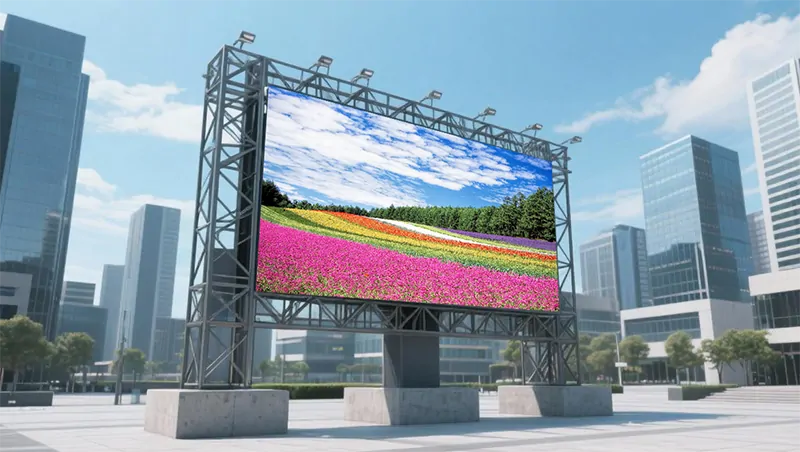
Roadside / highway-style cabinets. High brightness, heavy-duty, often dual-sided, mounted on poles. This is where structural engineering and wind loading become real concerns rather than paperwork.
Drive-thru and menu boards. Smaller, viewed up close, often under a canopy where heat builds up. Thermal design matters more here than anywhere else.
Indoor lobby and wayfinding signs. Lower brightness, finer pitch, quiet operation, and appearance matters as much as function.
Gas price and convenience store signs. Digit-only or simple character modules, must be readable in direct sun, must survive constant on-time.
Portable and trailer-mounted signs. Battery or generator powered, needs rugged cases and simple setup. Entirely different product conversation.
If you tell a supplier "I want an LED sign" without saying which of these, you will get whichever one they have in stock. And you will pay for it.
People ask this less often than they should. Full color costs more, draws more power, generates more heat, and in some municipalities triggers different permitting rules. If your sign only ever needs to show text, a single-color or dual-color board is brighter for the same power, easier to read at a glance, cheaper to run, and less likely to get you fined for looking like a television screen next to a road. There is a reason most highway message boards are amber. Readability wins over richness every time when the viewer is moving at forty miles an hour.
On the other hand, if you are replacing an old changeable letter board at a church or school and you want to put up a photo of the graduation class or a simple graphic, full color is exactly the upgrade people notice. Just do not buy full color and then never use it because nobody on staff knows how to make content. That happens more than you would think.
Brightness gets quoted as a big number, like 6,000 or 8,000 nits. That figure is measured on a fresh module at full white in ideal conditions. It is not what your sign will deliver after two years in direct sun with dust on the lenses. What you should ask for instead is the minimum guaranteed brightness after three years of operation, and whether the sign has automatic brightness adjustment via a light sensor. A sign that stays at maximum brightness all night is a nuisance complaint waiting to happen, and in a lot of jurisdictions it is also a code violation. Auto-dimming is not a luxury feature on an outdoor sign. It is part of the job.
IP rating comes up constantly and it is constantly misunderstood. IP65 means protected against water jets. IP68 means it can be submerged. For an outdoor sign, IP65 front is generally fine if the cabinet is properly sealed and drained. But the number on the datasheet is a lab result on a new unit, and the thing that actually kills outdoor signs is not a single rain event, it is slow moisture ingress over hundreds of thermal cycles, condensation inside a sealed cabinet, and corrosion on connector pins that nobody sees until a whole row goes dark. Ask how the cabinet handles condensation specifically. Ask whether there are breather valves, whether the modules are conformal coated, and whether the power supplies sit above any likely water path. A manufacturer that has thought about this will answer immediately. One that has not will repeat the IP number louder.
Viewing distance drives pixel pitch, and this is where money gets wasted. For a roadside sign viewed from fifty feet or more, P10 is perfectly readable and buying P6 is burning cash. For a drive-thru menu viewed from six feet, P10 looks like a mosaic. Rough guide: pitch in millimetres roughly equals the minimum comfortable viewing distance in metres times three or four. Closer viewing needs smaller pitch. Nobody standing across the street will thank you for the extra resolution, but your electricity bill will notice it.
| Sign type | Typical pitch | Where it works | Common mistake |
|---|---|---|---|
| Single-color scrolling message board | P10 / P7.62 | Storefronts, churches, schools, community boards | Buying full color when text is all you need |
| Full-color outdoor message board | P6 – P10 | Churches, schools, retail, campuses | No auto-dimming, ends up too bright at night |
| Roadside / pole-mounted cabinet | P10 – P16 | Highway-adjacent, large setbacks | Structure and wind load underestimated |
| Drive-thru / menu board | P3 – P6 | Under canopy, close viewing | Heat buildup ignored, panels cook themselves |
| Indoor lobby / wayfinding | P2.5 – P4 | Entrances, reception, halls | Too bright for a dim interior, becomes a glare source |
| Gas price sign | Digit modules | Fuel stations, convenience stores | Not specifying sun-readable brightness |
And the cost side, because this is where budgets actually break:
| Cost item | What people expect | What actually happens |
|---|---|---|
| The sign cabinet | Most of the budget | Usually only 40–55% of total |
| Structure, pole, foundation | An afterthought | Can run 15–30%, and concrete does not care about your deadline |
| Electrical work and permits | Included somewhere | Almost never included in the factory quote |
| Content setup and training | Free | Worth paying for properly, rarely budgeted |
| Shipping and import duty | Small | Heavy items, expensive freight, duty surprises |
| Spare modules and parts | Unnecessary | Essential, and batch matching matters |
Notice the pattern. The sign itself is barely over half of what you spend. Negotiating twelve percent off the cabinet saves you maybe six percent overall. Getting the structure wrong, skipping the permit, or forgetting that someone has to actually wire it up costs far more and cannot be fixed with a discount.
This is the question everyone asks and nobody answers well. Here is what I do now, and it takes about an afternoon.
Ask for the registered company name and the factory address, then check them against each other. A genuine manufacturer gives you both without hesitation. A trading company will give you a brand name and say they work closely with the factory. That is not automatically bad — plenty of traders are competent and add value — but you need to know which one you are dealing with, because when a component fails in month sixteen, you need to know whether the person you are emailing can authorise a replacement or has to go ask someone else.
Do a live video call during their working hours. Not a pre-recorded video, not a showroom tour shot last spring. Ask them to walk out onto the floor, find the exact model they quoted, show you the label, plug it in, and hold today's date next to it. Then ask them to bring the camera close to the module surface. You want to see the mask uniformity, the edge of the encapsulant, whether the black field looks even. Ask them to switch to a low-grey test pattern and hold it there. Then point a phone camera at it. Banding and dead rows show up fast and nobody can fake it live.
Ask about the ageing process. How long do they run the sign before packing, at what temperature, and do they log failures. A proper ageing room has racks of lit cabinets and a record of what failed. A shop that shortens ageing to hit a shipping date is handing you a sign that will discover its faults on your wall instead of theirs.
Ask for the oldest installed reference they have that you can check independently. Not the newest installation, not the glossy case study. A sign that has been outside for four years tells you about colour drift, about which power supplies went first, about whether the cabinet paint lifted, about whether the seals held. Ask specifically what broke and what they replaced. Anyone who says nothing has ever failed is either lying or has never gone back to look, and both answers disqualify them for different reasons.
This deserves its own section because it is the single biggest source of post-install regret, and it has nothing to do with hardware.
There are basically three setups you will encounter. Cloud-based platforms where you log in from any browser and push content to the sign over the internet. PC-based software where a computer on site drives the sign directly. And USB or SD card systems where you build the message on a computer, save it to a stick, walk outside, and plug it in.
Cloud is convenient until the subscription lapses or the server moves or the company changes its pricing. It is also the option most likely to still work when the person who set everything up leaves. PC-based gives you local control and no ongoing fees, but it ties you to a machine and an operating system that will eventually stop being supported. USB is gloriously simple and completely immune to network problems, and it is also the most tedious if you change messages twice a day.
The honest recommendation: pick the method that matches who will actually operate the sign. If it is a small team with no IT support, USB or a very simple cloud tool beats a powerful system nobody understands. If you change content frequently and multiple people need access, cloud wins. Either way, confirm before you pay that the software supports the languages and characters you need, that it handles scheduling, that it has a brightness schedule built in, and that you can export your content if you ever switch systems. And get written confirmation of what happens to the software licence if the manufacturer stops supporting it. That question sounds paranoid until it happens to you.
Not the dramatic failures. The slow ones.
Power supplies go first. They run hot, they run continuously, and cheap ones are the easiest place for a factory to save money. Ask for the brand and rating, and ask whether they are derated for continuous outdoor use. A derated supply running at sixty percent of its rated load will outlast a maxed-out one by years.
Modules fade unevenly. After a few years you may notice one section reading slightly duller than the rest, especially on a large sign where the top runs hotter than the bottom. This is why you buy spare modules from the same production batch as the original order, and why you buy them upfront while the batch still exists. Matching LEDs across batches is possible but it is a calibration job, not a swap.
Moisture finds the weak point. It is usually a seal around a door, a cable entry gland that was not fully tightened, or a connector that sits where water can drip onto it. Good cabinet design assumes water will get in somewhere and provides a drainage path so it can get out again. Ask about drainage explicitly.
Fans fail and filters clog. Signs with active cooling get louder over time and then run hotter. Passive designs avoid this but need more cabinet surface and better layout. In a dusty environment or under a canopy, plan on cleaning the filters twice a year. Nobody plans on it, and then the sign cooks itself.
Controller cards and receiving cards die quietly. Keep spares on site, and keep a copy of the configuration file somewhere you will actually find it. I have seen a perfectly good sign sit dark for a week because the replacement card arrived and nobody had the old settings.
Do not let the supplier talk you past this. Outdoor sign regulations vary wildly and they are enforced by the people down the road, not by the factory overseas. Size limits, brightness limits, curfews, animation bans, setback requirements, structural engineering stamps, electrical permits — all of it is local and all of it is your responsibility unless you have it in writing otherwise.
Two things trip people up repeatedly. Brightness curfews that require the sign to dim automatically after a certain hour, which means you need that light sensor and a schedule programmed in, not a manual setting. And animation rules that prohibit moving video within a certain distance of a roadway, which affects whether you can use video content at all. Check both before you design the content strategy, because redesigning after the sign is built is expensive and nobody refunds concrete.
Also worth checking: whether your local rules distinguish between on-premise advertising signs and message boards, because the permitting path can be completely different. A sign that is legal as a community message board may not be legal as an advertising display. Read the actual wording, not the summary.
Payment structure matters more here than with most hardware. Deposit against order, a milestone payment against evidence of production or a pre-shipment inspection, final payment after commissioning against a signed acceptance report, and a small retention held for a few weeks. Defects on an outdoor sign tend to show up after it has lived through some real weather and some real operating hours, and things get attended to noticeably faster when there is still money outstanding.
Write the acceptance test into the contract before anything ships. Full white, full red, full green, full blue, held long enough to spot dead pixels and uneven zones. A low-grey gradient to catch banding. A brightness measurement on site with an agreed meter and method. A check of the auto-dimming function at dusk. A physical inspection of seals, doors, locks, and cable entries. A test of the content upload process by someone who has never done it before. Date-stamped photos attached to the handover. Turn the spec sheet numbers into pass-or-fail checks. Without this, your warranty rests on a memory of what the sign looked like on a day nobody can prove anything about.
Lead time for a standard outdoor sign runs roughly four to eight weeks plus shipping, longer for custom sizes, specific LED bins, or pole-mounted structures. Add time for structural approval, permits, and commissioning. If the sign needs to be ready for a specific date — an opening, a season, an event — work backwards from that date and then add a month. Something will slip and it will not be your fault.
Freight on these items is punishing because cabinets are dense and packing is bulky. Confirm the tariff code and duty rate with a broker before you commit to a landed cost. Guessing here is how a project that looked affordable turns into an uncomfortable meeting.
Spares: three to five percent of modules, plus at least one spare power supply, one spare controller, and spare cables and locks, all from the same batch. Keep them on site. Training: make sure it goes to the person who will actually change the messages, not the person who signed the purchase order. A handover session that nobody attends is a handover that did not happen. Ask for a one-page cheat sheet in plain language covering what to do when the sign is blank, when it shows garbage, and when only half is lit. That sheet will get used more than the manual.
After watching a fair number of these go up, I have mostly stopped caring about whose name is on the brochure. LED signs are not hard to describe and moderately hard to do well for the long term. Plenty of factories can build one that looks great on delivery. The ones that still look right and still work smoothly five years later are the ones where somebody thought about heat, water, dimming, spares, and the person who has to change the message on a Tuesday morning in the rain.
So if it were my money, I would write the brief once, plainly: where the sign goes, who sees it from how far away, what it needs to say and how often that changes, whether it must be visible in direct sun, what hours it runs, who operates it, and what local rules apply. Send the same document to several suppliers. Drop anyone who cannot name the LED package, driver IC, power supply, and controller brands. Drop anyone who takes a week to answer a simple question. Drop anyone who only sends a generic catalogue. Insist on a live video check of the actual unit including a low-grey test and a phone-camera test. Lock the approved spec into the contract as an annex with written approval required for any substitution. Pay properly for the unglamorous bits — structure, permits, electrical, on-site commissioning, spares, and training — and be a bit ruthless about the flashy bits.
You will not regret that. You will regret saving a bit on the cabinet and discovering two winters in that the seals lifted at the corners, the replacement modules do not match, the software company changed its pricing, the sign blinds the neighbours after dark because nobody set the dimming schedule, and the only person who knew how to update the messages moved on. Hopefully that helps you sort out which suppliers are worth your time.
1. What pixel pitch should I choose for an outdoor LED sign?
Match pitch to your minimum viewing distance. For roadside signs viewed from 50 feet or more, P10 to P16 is standard and perfectly readable. For storefronts and signs viewed from 20 to 40 feet, P6 to P10 works well. For drive-thru menus and close-up viewing, P3 to P6. Buying a finer pitch than your viewing distance justifies adds cost and power draw with no real readability gain.
2. How bright does an outdoor LED sign need to be?
Look for a sign that can reach at least 5,000 to 6,000 nits peak for direct sunlight readability, paired with automatic brightness adjustment via a light sensor. The auto-dimming matters as much as the peak number, since a sign stuck at maximum brightness at night creates nuisance complaints and often violates local codes.
3. What IP rating is appropriate for an outdoor sign?
IP65 on the front face is generally adequate for outdoor signs, provided the cabinet is properly sealed, drained, and uses conformal-coated modules. Remember that the rating is a lab result on a new unit; long-term reliability depends on how well the cabinet handles condensation and thermal cycling over years, not on the number printed in the brochure.
4. Should I choose cloud-based or USB-based sign software?
Choose based on who will operate the sign. Cloud platforms suit teams that need remote access and frequent updates, but confirm the licence terms and what happens if support ends. USB or SD card systems are simple, offline, and reliable for infrequent updates. Always verify language support, scheduling features, and whether you can export your content.
5. Do LED sign manufacturers include installation and permits?
Generally no. Most manufacturers supply the cabinet, controller, software, and documentation. Structural design, foundations, electrical work, permits, and compliance with local sign ordinances are normally handled locally. Assume these are your responsibility unless explicitly agreed otherwise in writing.
6. How much should a complete LED sign project cost?
The sign cabinet itself typically accounts for only 40–55% of total project cost. Structure, pole, and foundation can run 15–30%, with electrical work, permits, shipping, duty, content setup, and spares making up the rest. Budget accordingly and be wary of quotes that include only the cabinet.
7. What spare parts should I keep on site?
Three to five percent of modules from the same production batch, plus at least one spare power supply, one spare controller or receiving card, spare cables, and door locks. LED batches drift in colour and brightness over time, and mismatched replacements show up as visible patches on the sign face.
8. What is a realistic lead time?
Four to eight weeks for a standard outdoor sign, longer for custom sizes, specific LED bins, or pole-mounted structures. Add shipping time, structural approval, permitting, and commissioning. If you have a hard deadline, work backwards from it and add a month.
9. What warranty terms should I insist on?
Three to five years is common for LED signs. The meaningful details are what components are covered, whether labour and freight both ways are included, the defined response time, whether spares are left on site, and whether technical support remains available in later years. A warranty without a response time is worth considerably less than one that specifies it.
10. How do I verify an LED sign manufacturer remotely?
Request the registered company name and factory address, do a live video call during working hours to inspect the actual unit with a low-grey test pattern, ask about their ageing process and failure logging, request the oldest independently verifiable reference installation, and ask specifically what has broken and been replaced. A genuine manufacturer will provide all of this promptly.
.jpg "China SMD Outdoor P10 LED Display Manufacturers | Vetting Guide")


.jpg "How to Vet Wholesale Color LED Display Manufacturers?")