English
If you are trying to find out who actually makes the rental indoor LED screen you want to put on your stage, you have probably already spent an hour going in circles on Alibaba, comparing quotes that look identical on paper but differ by forty percent in price. That is normal. The reason it feels confusing is that the word manufacture does three different jobs in this industry at once, and nobody tells you which one they mean until you ask. So let us start there, because once you see the structure, the rest stops being a guessing game.
rental indoor led screen manufacture — if you typed exactly that into a search bar, what you really want to know is: who builds these things, can I buy direct instead of renting through a middleman, and will I regret it. The short answer: most of the world's rental indoor LED panels come out of a fairly concentrated cluster of factories in Shenzhen and surrounding areas in Guangdong, sold either as their own brand or as OEM for regional rental companies and AV distributors. The longer answer is where the actual value is.
Not all factories are the same, and mixing them up is how people get burned.
Type A — the real OEM/ODM factory. They own the SMT lines, they do the die-cast cabinet tooling, they run the aging room, and they can change the PCB layout if you give them a volume commitment. They will happily put your logo on the cabinet and on the box. They usually want a meaningful order — we are talking pallets, not one wall. Lead time is real, and they will not chase you for a single quote.
Type B — the assembler/trader with a showroom. They buy modules, cabinets, power supplies and sending cards from other people, put them together, flash a config and ship. Nothing wrong with that per se — plenty of decent rental stock comes out of these operations — but their margin sits on top of someone else's margin, and when a batch of modules fails six months later, they are making a phone call to the same supplier you could have called yourself.
Type C — the rental house that also sells. Some big AV rental companies run their own private-label program. They know exactly what breaks on tour because they break it every weekend. Their spec tends to be pragmatic rather than flashy, which is often exactly what you want.
The honest thing I have learned here: Type B is not automatically worse than Type A for a buyer who only needs one or two walls. What matters is whether the person you are talking to can answer technical questions without checking with someone else first. That is the fastest filter I know. Ask them what refresh rate their P2.6 runs at native, and how they handle calibration data after a module swap. If the answer involves "let me confirm with our engineer," keep looking.
One thing that surprises people: almost nobody makes everything. Even the good factories buy in.
LED lamps/packages come from a handful of major suppliers. This is the single biggest determinant of color consistency and long-term brightness decay. Ask which brand and which bin range.
Driver ICs are sourced separately. This is what controls your refresh rate and gray scale.
Power supplies are third-party. Mean Well and equivalents. A cheap power supply is the most common cause of mid-show failure, and it is also the easiest place for a factory to save twelve dollars.
Receiving/sending cards — Novastar, Colorlight, Linsn. Usually bought in, sometimes rebranded.
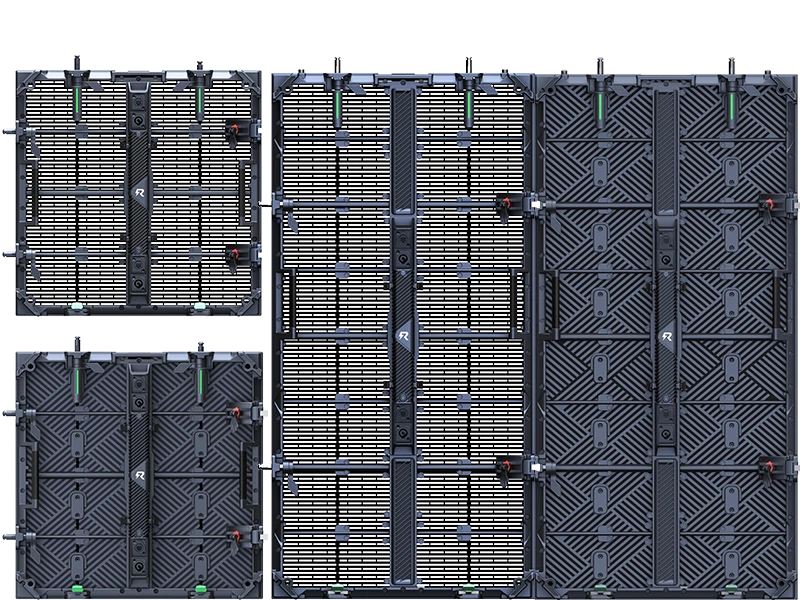
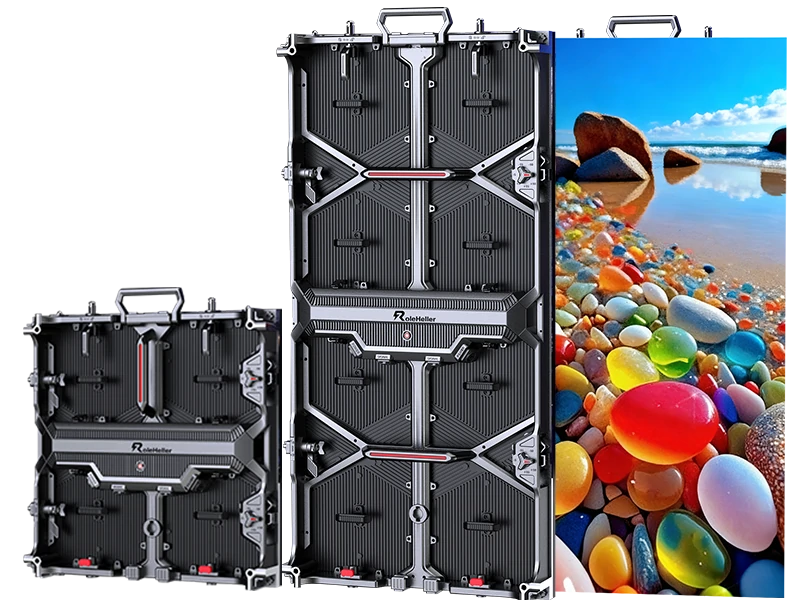
Die-cast aluminum cabinets — this is where the factory's own tooling matters. Flatness, lock mechanism, weight. This is the part you physically build with, and it ages faster than the electronics.
So when someone says "we manufacture everything in-house," treat it as marketing, not a spec. The better question is: which parts do you control, and which do you source?
This is where quotes diverge and buyers get confused. A P2.6 panel made for a permanent lobby wall and a P2.6 panel made for rental look the same in a product photo. They are not the same product.
| Feature | Rental-grade indoor | Fixed-install indoor |
|---|---|---|
| Cabinet | Die-cast aluminum or carbon fiber, quick-lock, tool-free front/rear service | Often sheet metal or simpler aluminum, screwed assembly |
| Weight target | As light as possible — faster build, lower rigging load | Weight barely matters |
| Module service | Front-access, magnetic or quick-release, swap in under a minute | Rear access often fine |
| Flatness tolerance | Tighter, because seams show on camera across repeated builds | More forgiving |
| Spare parts | Sold in bundles — modules, power supplies, cables, receiving cards | Minimal |
| Refresh rate | Higher priority (camera work) | Can be lower |
| Price | Higher per m² | Lower per m² |
If a factory quotes you a rental screen at a fixed-install price, something got lost in translation. Either the cabinet is not really rental-grade, or they have not understood what you need. Both are fixable, but only if you catch it before the deposit.
I keep a short list. It takes about ten minutes to send and it tells you more than any brochure.
Pitch and canvas. Confirm pixel pitch, cabinet dimensions (500×500 mm and 500×1000 mm are the standard), and the exact pixel count of the canvas you intend to build. Then ask whether their standard processor can drive that resolution without downscaling. This catches more problems than you would think.
Brightness and uniformity. Indoor rental typically lands between 600 and 1,500 nits. Ask for the measured value and the uniformity figure — ≥97% brightness uniformity is a reasonable ask. Peak brightness is easy to claim. Uniformity is harder to fake.
Refresh rate and gray scale. If anyone films this, you want 3,840 Hz or higher and 14–16 bit gray scale. Below that you get scan lines in footage and banding in gradients. Simple as that.
Calibration. Ask whether panels are calibrated per module at the factory and whether the calibration data travels with the module after a field replacement. This is the part that separates a screen that looks consistent in year three from one that develops patchy color by the second tour.
IP rating. Indoors you are usually fine with IP20–IP43. But if your show uses haze, fog or confetti, push for IP54. People forget this until a haze machine kills a batch of panels.
Certifications and paperwork. CE, RoHS, UL listing where relevant, and whether they can provide test reports rather than just logos on a datasheet. Also insurance documentation if your venue requires it.
Rough numbers, because everyone asks and nobody wants to be the first to say it. Per-square-meter pricing for rental-grade indoor panels generally moves with pitch: finer pitch, higher price, and the jump from P3.9 to P2.6 is not linear — it feels like a cliff. On top of the panel cost you need to count the processor and sending cards, flight cases, spare parts kit, freight, duties, and the local technician who actually knows how to make it work.
Here is where the trap is. A quote that comes in thirty percent under the others has almost always left out one of three things: the video processor, the flight cases, or the spares. Sometimes all three. Ask for a line-item breakdown and compare line by line, not total by total. It is boring work and it saves real money.
Also worth saying: the total cost of ownership on a rental screen is driven less by the purchase price and more by how many times you can rebuild it before the cabinets go out of flat. That is why cabinet quality deserves more attention than it gets.
Remote buying is normal in this trade. So is getting it wrong. A few checks that actually move the needle:
Ask for a live video call on the factory floor, not a recorded video. Ask them to walk to the aging room and show you a running wall with today's date visible somewhere in frame. Recorded videos get recycled between companies. A live call does not.
Request a sample cabinet before you commit to a wall. Yes, it costs money. Yes, shipping a single cabinet is awkward. But holding it in your hands tells you about weight, lock feel, edge alignment and service access in a way that no PDF can. Put two sample cabinets side by side from two different suppliers and the difference becomes obvious within thirty seconds.
Check the references that are not on their website. Anyone can list three happy clients. Ask for a customer who bought eighteen months ago and has been using the screens weekly since. Then actually call them and ask what has broken.
Start small. First order one wall, run it on real jobs, see how it behaves when it gets dropped, rained on in the loading bay, and rebuilt at two in the morning. Then scale. The suppliers who survive that test are the ones worth building a relationship with.
Q: Should I buy or keep renting?
A: The math is not complicated and it is mostly about utilization. If you are deploying screens fewer than ten to fifteen days a year, renting is almost certainly cheaper once you count storage, transport, calibration, firmware, and the person who knows how to fix it. Above that, ownership starts to make sense — but only if you have somewhere dry to store it and a technician available when something fails on a Friday night. The hidden cost people forget is the technician. Screens do not run themselves.
Q: Can I mix new panels with the ones I already own?
A: Sometimes, and you should not assume yes. Even the same pitch from the same factory can shift color over a couple of years as the LEDs age. New modules next to old ones will show a patch. The practical answer is to buy enough extra from the original batch to cover future expansion, and keep them in storage. Future-you will be grateful.
Q: What is the realistic lead time?
A: For standard configurations, figure four to eight weeks plus shipping. Custom pitch, custom cabinet size, or anything involving new tooling pushes that out considerably. And if you are ordering near a major holiday period in China, add time — ports close, factories shut down, and your project does not care.
Q: Do I need a local partner or can I go direct?
A: Direct gives you better pricing and clearer technical answers. A local partner gives you someone who shows up when a panel dies the morning of the show. There is a genuine trade-off here. What some buyers do, and it works reasonably well, is buy the hardware direct and contract a local AV company separately for installation and on-site support. You keep the price advantage and you still have a body on site. Just make sure the local team is comfortable with the control system you are buying.
Q: What about warranties, really?
A: Read the actual warranty text, not the headline number. Key details: whether spare parts are included or billed, who pays return freight, whether the warranty covers labor, and whether it transfers if you resell the equipment. A three-year warranty that requires you to ship failed modules back to Shenzhen at your own cost is worth considerably less than a one-year warranty with a local spare pool.
Ordering the finest pitch available because it sounds impressive. Pitch should follow viewing distance and content, not ambition. If the front row is eight meters back, nobody can tell the difference between P2.6 and P3.9, but your budget certainly can. Spend that money on more square meters instead. Bigger almost always beats sharper in a live room.
Designing content after ordering the screen. Do it the other way around. Decide the canvas, then design to its native resolution. Putting a 1920×1080 video onto a panoramic canvas is how you end up with letterboxing on a six-figure setup.
Skipping the spare parts conversation. Modules fail. Power supplies fail. Cables definitely fail. The question is whether you discover it during load-in or during the keynote. Order a spares kit at the same time as the wall — typically a few percent extra in modules, a handful of power supplies, receiving cards, and cables. It is cheap insurance.
Assuming brightness is the only number that matters. It is not. Uniformity, gray scale, and viewing angle do more for perceived image quality than another two hundred nits ever will.
Forgetting about rigging and power until delivery week. Every square meter carries weight and draws current. Check your venue's load limits and available amperage before you sign, not after. Peak draw is notably higher than average draw — size your circuits for peak.
The thing nobody puts in a spec sheet: the best outcome in this category rarely comes from finding the absolute cheapest factory. It comes from finding a supplier who answers the phone at inconvenient times and ships you a replacement module without arguing. Rental screens get abused. They get loaded in the rain, bumped by forklifts, and rebuilt by tired crews at odd hours. You are not buying a static product, you are buying a long-term arrangement with a company that needs to still exist and still care three years from now.
That is why I lean toward starting with a modest order, running it hard for a season, and then deciding. It costs a bit more upfront and it prevents a lot of expensive disappointment. Also, if you can, go see the factory. Not because you need to inspect the SMT line personally, but because the conversation you have standing next to a running wall is qualitatively different from the one you have over email. People behave differently when they know you have seen where the thing comes from.
My own take, for what it is worth: if you are an event company planning to run screens regularly, buying direct from a competent manufacturer makes sense and the payback is real. If you are a brand or an organizer doing a handful of shows a year, rent from a house that owns its gear and employs its own technicians, and spend your energy on the content instead. The screen is only as good as what you put on it, and great content on a mediocre wall beats perfect hardware with lazy graphics every single time. That is the part that actually moves the audience.
1. Who manufactures rental indoor LED screens?
Most production is concentrated in Guangdong province in China, particularly Shenzhen and nearby cities. Factories sell under their own brands or as OEM for AV distributors and rental companies worldwide. Regional assembly and branding also happens in Europe and North America using imported modules and cabinets.
2. What is the difference between a manufacturer and a trader?
A manufacturer owns the production lines, tooling, and aging facilities, and can modify designs. A trader sources components or finished panels from factories and resells them. Traders can be perfectly legitimate, but they add a margin layer and depend on their supplier for technical support and warranty fulfillment.
3. What pixel pitch is best for indoor rental?
P2.6 to P3.9 covers most indoor event applications. Choose finer pitch when the front row is within four meters or when the screen will be filmed. For audiences beyond eight meters, P3.9 delivers comparable perceived sharpness at lower cost.
4. What refresh rate do I need?
For any camera or livestream work, specify 3,840 Hz or higher. For audience-only viewing in a dim room, 1,920 Hz may suffice, but the price difference is small enough that high refresh is worth specifying by default.
5. How long does manufacturing take?
Standard configurations typically require four to eight weeks plus shipping. Custom pitches, cabinet sizes, or orders placed near major holiday periods require additional lead time.
6. Should I buy or rent?
If you deploy screens fewer than ten to fifteen days per year, renting is usually more economical. Frequent use favors ownership, provided you have storage, transport, and technical support in place.
7. What should I ask for to verify a supplier?
Request a live video call showing a running wall, order a sample cabinet before committing to a full wall, ask for line-item pricing, and contact a customer who has been using the screens for at least a year.
8. Are spare parts important?
Yes. Order a spares kit with your initial purchase — extra modules, power supplies, receiving cards, and cables. Module and power supply failures are routine in rental use, and having parts on hand prevents show-day emergencies.
9. Can I add to my screen later?
Possibly, but color matching between new and aged panels is not guaranteed. Purchase extra modules from the original production batch for future expansion and store them properly.
10. What certifications matter?
Look for CE, RoHS, and UL listings appropriate to your market, and ask for actual test reports rather than certification logos on a datasheet. Also confirm the supplier can provide insurance documentation if your venue requires it.


.jpg "Who sells wholesale LED displays?")